4shared4.101.0
Publisher Description
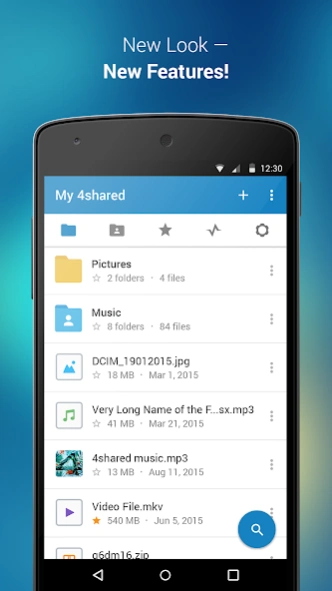


Search, store, transfer and share files easily
Search for files within a huge 4shared library, upload them to your cloud storage, save on device and share with friends - almost instantly with 4shared for Android.
4shared for Android is a free, easy-to-use mobile application, which enables you to find and save music, videos, books, games and other files at 4shared for offline access on your smartphone or tablet, as well as transfer and share them with others in a few simple steps.
The 4shared app also includes robust music and video streaming features, which allow you to listen to songs & live streams and watch multiple videos anytime, directly on your Android device.
Features:
• Fast file search
Get access to a massive 4shared library with millions of files and discover what you’re searching for fast & easy. Simply enter a keyword (e.g. song title), and get the search results in seconds, or select a file category and/or add a search filter (e.g. upload time, file size, etc.) - in order to narrow the list of results and find the file you need even faster.
• One-tap save
Found the file you were searching for at 4shared? Add it to your cloud storage and save it on your mobile device in one tap for further access and use, even when you’re offline.
• Instant file sharing and transfer
Wish to share any data with others? 4shared for Android enables you to share files with your friends, colleagues and family via email, messengers and other apps; or transfer files directly to nearby devices - smoothly.
• Music and video streaming
4shared for Android enables you to play songs and live streams, create and share your own music live streams with others, and, of course, watch multiple videos in high quality and without interruptions directly in the app.
• Free cloud storage
The 4shared app is a fast and easy way to access files and folders already stored in your 4shared account and upload new files (e.g. photos and videos) to it from your Android device, or the 4shared library, for further use and sharing.
• Easy-to-use app chat
Communicate with your friends, who’re also using 4shared, exchange media and other files and get instant alerts about updates in your account directly in the app chat.
• No Ads
Wish to enjoy the 100% ad-free 4shared experience? Switch off all ads in your 4shared app by subscribing to 4shared PRO membership.
For more information about priority download and other 4shared PRO benefits, please visit https://4shared.com/premium.jsp
—
The app may request you to grant the following permissions - here’s why:
• Photos & Video - enables photo & video upload from Android device (including Camera upload) to your 4shared account and the download of files from your account to the phone storage or SD card.
• Music & Audio - enables music & audio upload from Android device to your 4shared account, their streaming and download from your account to the phone storage or SD card.
• Location - used for enabling the direct sharing of files with near-by devices, streaming of live broadcasts in the near-by area and searching for popular files in your region.
• Notification - used for enabling the 4shared app to notify you of new messages and other updates/alerts within the app.
• Contacts - only used for reading the contact list. This enables sharing your files to emails from your contacts and chatting with your friends in the app.
• Phone - only used for reading the status of any ongoing calls. This enables pausing streamed music in the app, when someone’s calling you.
Note! Even though all of the mentioned permissions are optional, we recommend that you grant them in order to ensure the best app performance and your full access to all of its functional capabilities.
Facebook Network Audience:
https://m.facebook.com/ads/ad_choices
Privacy Policy: https://www.4shared.com/privacyForApps.jsp
Terms of Service: https://www.4shared.com/terms.jsp
About 4shared
The company that develops 4shared is New IT Solutions. The latest version released by its developer is 4.101.0. This app was rated by 8 users of our site and has an average rating of 2.8.
To install 4shared on your Android device, just click the green Continue To App button above to start the installation process. The app is listed on our website since 2026-10-08 and was downloaded 505 times. We have already checked if the download link is safe, however for your own protection we recommend that you scan the downloaded app with your antivirus. Your antivirus may detect the 4shared as malware if the download link to com.forshared.files is broken.
How to install 4shared on your Android device:
- Click on the Continue To App button on our website. This will redirect you to Google Play.
- Once the 4shared is shown in the Google Play listing of your Android device, you can start its download and installation. Tap on the Install button located below the search bar and to the right of the app icon.
- A pop-up window with the permissions required by 4shared will be shown. Click on Accept to continue the process.
- 4shared will be downloaded onto your device, displaying a progress. Once the download completes, the installation will start and you'll get a notification after the installation is finished.
Program Details
System requirements
Download information
Pricing
Version History
version 4.101.0
posted on 2026-10-08
- Improved search experience
- New awesome 4shared Music & Video Player
- 4shared PRO subscription is now available with premium features, priority download and absolutelly NO ads!
version 4.101.0
posted on 2026-10-08
- Improved search experience
- New awesome 4shared Music & Video Player
- 4shared PRO subscription is now available with premium features, priority download and absolutelly NO ads!
version 4.78.0
posted on 2024-06-13
- New and awesome 4shared Music & Video Player
- 4shared PRO subscription is now available with premium features, priority download and absolutelly NO ads!
version 4.75.0
posted on 2024-04-08
- New and awesome 4shared Music Player
- 4shared PRO subscription is now available with premium features, priority download and absolutelly NO ads!
version 4.66.0
posted on 2023-10-23
- Fixed issue with black screen on search
- New and awesome 4shared Music Player
- 4shared PRO subscription is now available with premium features, priority download and absolutelly NO ads!
version 4.65.0
posted on 2023-10-13
4shared PRO subscription is now available with premium features, priority download and absolutelly NO ads!
version 4.56.0
posted on 2023-04-26
NEW! Live streaming is here. Listen music with whole world!
version 4.27.0
posted on 2021-06-18
version
posted on 2020-09-09
- Dark theme is here!
version
posted on 2016-12-27
- Download improvements,- New! View, backup and share your photos easy with new camera upload functionality.
